Objectives
- To learn how to use a combo box and list view to show lists of data.
- To learn how to use the SELECT command to read multiple records from a table.
- To learn how to add entries to a list using the ADD_ENTRY command.
- To learn about list properties and how lists can be made to interact with on another.
- To create a form that displays departments in combo boxes and employee data in a list view.
- To show how to use Themes to change the appearance of forms and their components.
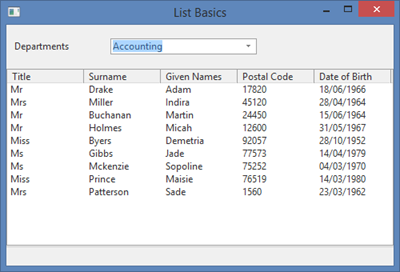
- The completed form loads departments into a combo box and populates a list view with employees for the current department.
- When a new department is selected, the employee list view is cleared and repopulated.
To achieve these objectives, you must complete the following:
Step 2. Select Data to Fill the List
Step 4. Fill the Employees Lists
Step 5. Make List View Columns Sortable
Step 6. Change Appearance of the Form
Before You Begin
Complete all previous exercises.