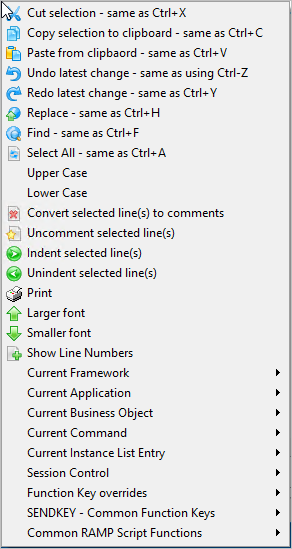
You can use the scripting pop-up menu to format and edit your scripts. To display the menu, right-click the Script Area.
| The first set of options Cut, Copy, Paste, Undo and Redo are commonly used options in many editors and are self-explanatory. |
The Upper Case and Lower Case options will change the case of any text currently selected in the script editor. Note that Javascript is case-sensitive. | |
The Lower font and Larger font options allow you to change the size of the font being used by the text editor. | |
The Show Line Numbers option displays (or hides) line numbers in the text editor. | |
Use The Current... options to insert properties for various Framework objects into your script. Use:
| |
Use the 5250 Subfile Handling options to insert code for Subfiles/Browselists. | |
Use the Session Control options to enter commonly used functions and objUser parameters to your script. |
Examples: