The toolbar options provide quick access to create, modify, and save scripts in the Query Analyzer. 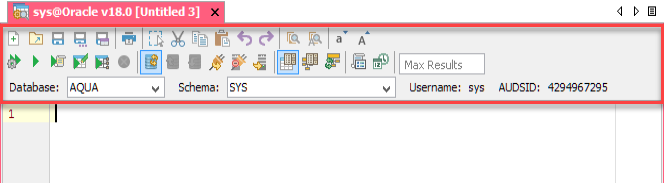
The following table describes the Toolbar options, along with the keyboard shortcut keys.
| Toolbar Options | Keyboard Shortcut | Description |
| CTRL + N (Windows & Linux) | Creates a new script file. |
| CTRL + O (Windows & Linux) | Opens an existing script file. |
| CTRL + S (Windows & Linux) | Saves changes to an existing file. |
| CTRL + SHIFT + S (Windows & Linux) | Saves the script as a new file. |
| CTRL + R (Windows & Linux) | Saves the query result to a file or sends the result to the clipboard in the specified data format. |
| CTRL + P (Windows & Linux) | Opens the print dialog. |
| NA | Enables or disables the Block Selection mode in the editor. |
| CTRL + X (Windows & Linux) | Removes the selected script. |
| CTRL + C (Windows & Linux) | Copies the selected script. |
| CTRL + V (Windows & Linux) | Pastes the script on a script file. |
| CTRL + Z (Windows & Linux) | Undo the last action. |
| CTRL + SHIFT + Z (Windows & Linux) | Redo the last action. |
| CTRL + F (Windows & Linux) | Finds text within the opened file. |
| CTRL + H (Windows & Linux) | Finds and replaces text within the opened file. |
| CTRL + L (Windows & Linux) | Changes the current word or selected text to lower case. |
| CTRL + U (Windows & Linux) | Changes the current word or selected text to upper case |
| CTRL + ALT + A (Windows & Linux) | Parses the script and displays a list of the commands to be executed on the server. |
| CTRL + E (Windows & Linux) | Executes the script in the query window. |
| CTRL + ENTER (Windows & Linux) | Executes the current statement, defined by the cursor position. |
| CTRL + ALT + ENTER (Windows & Linux) | Executes the SELECT statement and opens the result in an editable window. |
| CTRL + SHIFT + ENTER (Windows & Linux) | Displays Visual Explain Plan for the current statement. |
| CTRL + ALT + BACKSPACE (Windows & Linux) | Cancels the currently executing statement or script. |
| CTRL + SHIFT + A (Windows & Linux) | Determines whether commit is performed automatically after each statement is executed. |
| CTRL + SHIFT + C (Windows & Linux) | Commits any active transactions. |
| CTRL + SHIFT + R (Windows & Linux) | Rollbacks any active transactions. |
| CTRL + SHIFT + INSERT (Windows & Linux) | Reconnects the current connection. |
| NA | Disconnects the current connection for this Query Analyzer. |
| NA | Opens a new Query Analyzer with the selected server connection. |
| CTRL + SHIFT + U (Windows & Linux) | Enables or disables auto-completion. |
| CTRL + SHIFT + O (Windows & Linux) | Displays tables/views for all schema objects, other than just the current schema. |
| CTRL + SHIFT + E (Windows & Linux) | Clears the current autocompletion cache. |
| NA | Enables or disables the parameterized scripts. |
| NA | Sets a limit on the number of rows that Aqua Data Studio can retrieve after querying a table. |
| NA | Selects the Database (and Schema) to be used. Displays User, Connection ID, AUDSID, and other details specific to the RDBMS vendor. |


See Also, Menus and Toolbars.