Page History
...
Save your Framework definition file | You need to create a save file for the Framework definition. See Generate VLF-ONE or VLF-Web Resources in the Framework guide for instructions of how to copy the DAT file to the IFS if it is not there already. | The Framework definition file will have the form XXXXXXXXX_LLLL_VLFONE_Definition.DAT where XXXXXXXXX is the Framework name and LLLL is the language. |
...
Include all the standard Framework objects in the export list | Use F8 to make generic selections when adding objects to the export list. | ||
Processes/functions: | VF_PR001/VFU0012 | ||
Other/non-LANSA: (Type *SRVPGM) | U_BIF985 | ||
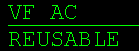
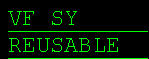
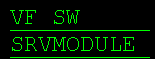
Visual LANSA components: | VF_AC* - filter by type REUSABLE: |

Include all your own LANSA objects in the export list | Add your objects (filters, command handlers etc.), multilingual text variables, system variables, message files, files, processes, functions and images used in the application. Make sure you include your custom snap-in components. For more information please refer to VLF-ONE Snap-In Points Summary in the Framework Guide. | ||
Review the export list and make sure included objects are exported compiled (if applicable). | Specify Y in the Comp Form column of processes, functions, VL components etc. Save the list (F19). |
Export the list |
| Create a save file Bnn_ALL for your export list using the CRTSAVF command. CRTSAVF Bnn_ALL Export your export list to the save file using option 7 (= Export) in the Work with Export Lists menu. |