WhereScape is pleased to announce that WhereScape RED 10.6.0.3 is now available.
This release of RED is compatible with WhereScape 3D 9.0 versions and up.
Note
Go to https://www1.wherescape.com to see available product versions and release notes for older versions.
Log into the WhereScape Support Portal to access downloads.
New Features
Extensible Authentication
In this release of RED we have added a new feature enabling Extensible Authentication for Connections in RED. This feature combines connection resilience, authentication scripts and extended RED Profile attributes to create a framework for connecting to systems which require complicated client side authentication workflows not provided directly by their respective ODBC drivers and/or tools.
This feature enables working with authentication workflows such as oAuth 2.0 and Entra ID, but also allows a way to pop-out to additional authentication UI's such as for entry of Time-based One-Time Passwords for multi-factor authentication.
This feature is enabled through the following new functionalities of RED for ODBC/Database and Extensible Source Connections:
New Advanced Connect Parameters on Connections
Two new groups under Advanced Connect Parameters have been added to Connections, all of these session-level fields are in-memory only and can be persisted to your RED Profile between sessions.
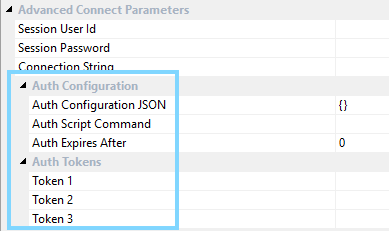
Auth Configuration
- Auth Configuration JSON - Arbitrary JSON storage of any required authentication attributes for this connection.
- Auth Script Command - When specified this command will be triggered during RED's authentication process to this connection.
- Auth Expires After - Duration in mins after which RED will reconnect at the next opportunity.
Auth Tokens
- Token (1,2,3) - Three new encrypted fields which can be used in connection strings using the token format $AUTHTKN_[1|2|3]$ for expansion at runtime. Display names can be adjusted via the RED Profile to suit a particular authentication type.
Scripted Authentication
Scripted Authentication can be enabled for a connection by providing a command line to run in the 'Auth Script Command' field. This command will be triggered by RED when it needs to authenticate with this connection for the first time and then again whenever the 'Auth Expires After' minutes has been exceeded.
When RED executes the 'Auth Script Command' this is the typical workflow:
- RED UI
- Saves the current RED Profile to disk and provide access to this Profile file and the connection name requiring authentication via environment variables.
- Runs the 'Auth Script Command'.
- Authentication Script
- Reads the RED Profile and retrieves any required Connection details from it.
- Performs the required authentication workflow for the connection.
- Updates the RED Profile on disk with refreshed Auth Tokens and other Auth Configuration values as required.
- RED UI
- Merges the updated RED Profile file back into memory.
- Completes the authentication process for the connection.
- Resets the internal expiry for the connection based on 'Auth Expires After' mins.
Authentication Environment Variables for All Scripts
The Extensible Authentication feature also enables the following new environment variables in RED Scripts, both via Azkaban and RED UI:
- WSL_[META|SRC|TGT]_AUTHCFG - contains the complete JSON structure in the 'Auth Configuration JSON' field.
- WSL_[META|SRC|TGT]_AUTHTKN_[1|2|3] - Sets of three decrypted Token values from the 'Auth Tokens' fields.
The RED Scheduler Profile table has been updated to incorporate these new fields in order to provide these values to Azkaban jobs, these can be maintained via the Scheduler Profile Maintenance script. Scripted Authentication is not supported for Azkaban in this version.
Other Improvements
Performance Improvements
- This release adds new indexes to the RED Metadata to enhance metadata query performance throughout the product.
- Improved the performance of opening object properties on large repositories.
Scheduler Improvements
- Improved publishing of Jobs via Application deployment
- Full Job Success and Failure Command Support (added in RED 10.6.0.2)
Detailed Changes in RED 10.6.0.0
The following changes have been implemented since 10.5.0.0
Improvements
| JIRA | Release Note |
|---|---|
| RED-12352 | Updated the wsl_scheduler_profile_maintenance script to support the new authentication fields added in 10.6.0.0 |
| RED-12343 | Added Scripted Authentication support to RED UI enabling extensible authentication methods for RED ODBC, Database and Extensible Source Connections |
| RED-12320 | Improved performance of opening object properties on large repositories. |
| RED-12302 | Added support to the RED Scheduler Plugin to support the new authentication tokens and connection string expansion added in RED 10.6.0.0, additional fields have been added to redadmin.ws_scheduler_profile to securely store these tokens. |
| RED-12092 | Improved performance of the RED Metadata by adding indexes to support the common metadata join patterns throughout the product. |
Fixes
| JIRA | Release Note |
|---|---|
| RED-12361 | Fixed an issue where creating deployment applications via the command line was broken in 10.5.0.0 |
| RED-12347 | Fixed a 3D export to RED issue where Named Targets; SQL Server, Oracle and Teradata were unable to be resolved during deployment. |
| RED-12328 | Fixed a RED Metadata syntax issue which caused update failures during manual alterations of Index Objects in RED, affecting PostgreSQL versions 15+ |
| RED-12322 | Deleting jobs via application deployment will now trigger the scheduler integration script to remove the job from Azkaban. |
| RED-12314 | The new 'execute-script' method of scheduler-util.jar is now thread safe when running in multi-threaded jobs. |
| RED-12309 | The RED feature in Azkaban to execute a kill script in case of a job being manually aborted now inherits the JRE from the parent process, avoiding the need to have java on the system path. |
| RED-12308 | Resolved a RED Scheduler Plugin issue where replacements of Extended Properties via the token format $WSL_EXP_<property_name>$ were not working |
| RED-12295 | Fixed an issue where Application Deployment of Jobs was not setting the credentials for the Scheduler REST API, causing publishing of deployed jobs to fail. |
Detailed Changes in RED 10.6.0.1
The following changes have been implemented since 10.6.0.0
Improvements
| JIRA | Release Note |
|---|---|
| RED-12353 | Added support for entry of the new Auth Tokens, introduced in RED 10.6, to the Scheduler Profile Maintenance wizard. |
| RED-11533 | RED SQL Admin query tool 'dba.exe' is now Advanced Connect aware enabling seamless authentication when launching from RED Connections that utilize Advanced Connect ODBC connection stings. |
Fixes
| JIRA | Release Note |
|---|---|
| RED-12323 | Resolved an issue with Application Deployment where column names greater than 64 chars, which are also a Data Vault Hash Key column name or a HK column source were losing their HK sources associations during RED to RED deployment. |
| RED-12354 | Resolved a display issue in Project Object Maintenance wizard where objects were displaying in the wrong projects due to incorrect ordering of the project drop downs. |
| RED-12351 | Fixed an issue in the Scheduler Profile Maintenance wizard where the credentials row added for the Scheduler REST API were not able to be decrypted. |
RED-12344 | Fixed an issue where action script association to stand-alone procedures is lost during deployment, caused by an ordering issue in the WST files. Affected deployment applications will need to be recreated to correct the ordering. |
Detailed Changes in RED 10.6.0.2
The following changes have been implemented since 10.6.0.1
Improvements
| JIRA | Release Note |
|---|---|
RED-12404 | Added Job Success and Failure command support to the RED Scheduler Plugin. |
Detailed Changes in RED 10.6.0.3
The following changes have been implemented since 10.6.0.2
Improvements
| JIRA | Release Note |
|---|---|
RED-12404 | Improved the RED Login workflow when using Scripted Authentication so that Metadata Connection attributes are refreshed via the returned profile, enabling the ability for the Auth. Script to override what was originally entered in the login screen. Improved the syncing of the in-memory profile when changing the connection string in RED UI to avoid synchronization issues for Scripted Authentication. |
RED-12296 | Improved RED's encoding detection of 3D Exported XML files when loading from XML files generated by versions of 3D earlier than 9.0.6.0, after which 3D always encodes with UTF8. |
RED-12078 | Improved [PROCEDUREOWNER] token replacement so that it is standardized across all targets. From this release onwards only the target location settings of the object will be considered when expanding this token, DB ID set at the connection properties page level will be ignored. This change is particularly useful for Teradata and Oracle procedures. |
Fixes
| JIRA | Release Note |
|---|---|
RED-12403 | Fixed an issue with Entra ID auth on PostgreSQL where RED would crash during browse operations when any password exceeded 1024 chars. |
RED-12358 | Fixed an issue introduced in RED 10.4 where running interactive linux loads would fail. |
Important Messages When Upgrading
If there are important updates to the Azkaban metadata these will be indicated in the important upgrade messages that follow. Refer to the Upgrading Azkaban section of the RED User Guide for more details.
Important Messages when upgrading to 10.6.0.3
Note
Upgrades are cumulative; therefore you should read all upgrade messages for each version between your current RED version and this version of RED.
Upgrading RED
Version 10.6.0.0
- This version adds new RED Metadata indexes to improve query performance, these indexes will be applied automatically when missing during upgrades.
Version 10.5.0.0
- There are no important messages for upgrading RED to this release, but please consider the cumulative upgrade messages below when upgrading.
Version 10.4.0.0
- There are no important messages for upgrading RED to this release, but please consider the cumulative upgrade messages below when upgrading.
Version 10.3.0.0
- There are no important messages for upgrading RED to this release, but please consider the cumulative upgrade messages below when upgrading.
Version 10.2.0.0
10.2 has potentially breaking changes for upgraded repositories; therefore, upgrades should be tested thoroughly before upgrading production environments:
- All ODBC, Database, Extensible Source Connection and Scheduler Configuration credentials have moved to the RED Profile, therefore each user of RED should generate their own local profile file (see the user guide for details) to continue using RED.
- For new installs, from RED 10.2.+, you will find the wsl_scheduler_profile_maintenance host script under your Host Script's in your RED metadata repository (see the user guide for details). For upgraded repositories you will need to load this script into RED manually from <RED_Installation_Directory>\Administrator\Scripts\wsl_scheduler_profile_maintenance.ps1
- All Azkaban components require upgrading and the encrypted Scheduler profile records added to redadmin.ws_scheduler_profile (see the user guide for details) in order for jobs to run.
- Post upgrade it is encouraged to remove all credentials from the metadata since these should now reside in the in-memory session level credentials only. Run the following update on the metadata to achieve this: Remove credentials after upgrade
-- Remove credentials from Database, ODBC and Extensible Source connections
UPDATE red.ws_dbc_connect
SET dc_extract_userid='', dc_extract_pwd='', dc_admin_userid='', dc_admin_pwd=''
WHERE dc_type IN ('D','O','Z');

-- Remove credentials from Scheduler Configuration
UPDATE red.ws_wrk_external_scheduler
SET wes_dashboard_userid='', wes_dashboard_pwd='', wes_restapi_userid='', wes_restapi_pwd='';
Version 10.1.0.0
10.1 has potentially breaking changes for upgraded repositories; therefore, upgrades should be tested thoroughly before upgrading production environments. The potential issues after the upgrade are the following:
- Default Routine Template settings might be lost. For object types other than Load and Export these settings have been moved from target connections to the Object Subtypes. During the metadata upgrade process, the first target-enabled connection found is used to populate the new settings under Object Subtypes. If you have multiple target-enabled connections in your repository, the optimal connection may not be used for the settings transfer. Ensure to check the Object Subtypes maintenance wizard after an upgrade to this version and set any missing/incorrect default routine templates as required. Note: this configuration can be exported from test to production once resolved in test.
- [TABLEOWNER] an $OBJECT$ token expansion no longer expands empty schemas to an additional ‘.’ in table names. This means from this release onwards you must specify the actual schema name in target location settings when schema is required on your platform. Ensure to check your target location settings for target connections before upgrading and populate the schema field, if required.
Upgrading Azkaban
Upgrading Azkaban is currently a manual process, please refer to the RED User guide for detailed upgrade instructions.
Version 10.6.0.2
- RED 10.6.0.2 added support for Job Success and Failure commands. The Azkaban Web Server and each Azkaban Executor will need to be upgraded to work with this release.
If you had already implemented Success and Failure commands via customizations to the scheduler publish script using Azkaban conditional flow logic then these publish script changes should be reverted and those jobs republished, otherwise Success and Failure command execution may be duplicated.
Version 10.6.0.0
- RED 10.6.0.0 added functionality to enable the new Extensible Authentication fields. The Azkaban Web Server and each Azkaban Executor will need to be upgraded to work with this release.
Version 10.5.0.0
- RED 10.5.0.0 added functionality to remove interactive scheduler jobs after execution. The Azkaban Web Server, each Azkaban Executor and the scheduler integration script wsl_scheduler_publish will need to be upgraded to take advantage of this feature.
Version 10.4.0.0
- RED 10.4.0.0 improves logging from metadata connection resilience so that the actual reason given by the driver is logged when reconnecting. Additionally improvements have been made to the RED Job Plugin. The Azkaban Web Server and each Azkaban Executor will need to be upgraded to take advantage of these features.
- RED 10.4.0.1 Minor improvements have been made to the RED Job Plugin. Each Azkaban Executor will need to be upgraded to take advantage of these optional fixes.
- RED 10.4.0.2 Minor improvements have been made to the RED Job Plugin. Each Azkaban Executor will need to be upgraded to take advantage of these optional fixes.
Version 10.3.0.0
- RED 10.3 improves the metadata connection resilience in both the Azkaban Web Server component and RED Job Plugin. Each of the Azkaban metadata, Azkaban Web Server and Azkaban Executors will need to be upgraded to take advantage of these features.
Version 10.2.0.0
- In RED 10.2 Advanced Connect is always enabled and therefore there are new azkaban.local.properties fields (and response.xml tags) required that support this feature. Any automated installation scripts will need to take into account these new fields. Each of the Azkaban metadata, Azkaban Web Server and Azkaban Executors will need to be upgraded to work with this release.
Azkaban Change history
Change history for Azkaban components requiring upgrades (changes are cumulative):
- 10.0.6.2: Added Job Success and Failure command support to the RED Scheduler Plugin.
- 10.6.0.0: Added Extensible Authentication feature affecting the Profile metadata table and script execution.
- 10.5.0.0: Added functionality to remove interactive scheduler jobs after execution.
- 10.4.0.2: SchedulerUtils.jar has a new method that allows running RED script objects standalone.
- 10.4.0.1: Standalone Batch\Unix\Linux script support. Fixes for resolving references to Dim View objects.
- 10.4.0.0: Connection resilience logging improvements. Bug fixes for RED Job Plugin. Component upgrades.
- 10.3.0.0: Azkaban/RED metadata connection resilience improvements. Component upgrades.
- 10.2.0.0: New required fields for azkaban.local.properties and installer resposne.xml for Advanced Connect. Stand-alone script execution enhancements.
- 10.1.0.1: Log4j components upgraded to log4j2 to resolve logging issues.
- 10.1.0.0: Improvements when canceling running jobs. Component upgrades.
- 10.0.1.0: Added procedure support and long host names fix.
- 10.0.0.0: First release.
Upgrading Scheduler Integration Scripts
The default scheduler integration scripts are often improved, occasionally these improvements are required to work with a new release. Please refer to the change history below and refer to the RED user guide for detailed upgrade instructions.
Integration Scripts Change History
Change history for integration scripts requiring manual upgrade (changes are cumulative), upgrades are optional unless marked as required:
- 10.6.0.0:
- wsl_scheduler_profile_maintenance - Required upgrade - Added support for new Extensible Authentication fields.
- 10.5.0.0:
- wsl_scheduler_publish - Added functionality to remove interactive scheduler jobs after execution.
- 10.4.0.0:
- wsl_scheduler_publish - Fallback to script run directory when WSL_WORKDIR is not set. Cleanse API URL by removing trailing '/' before using it.
- wsl_scheduler_lookup - Cleanse API URL by removing trailing '/' before using it.
- wsl_scheduler_profile_maintenance - Added special row for WSL_SCHEDULER_API entry, improved connection ordering in UI.
- 10.3.0.0: No changes
- 10.2.0.0:
- wsl_scheduler_publish - Required upgrade - Advanced Connect feature added.
- wsl_scheduler_lookup - Added version header and removed unused parameters.
- wsl_scheduler_dashboard - Added version header and removed unused parameters.
- wsl_scheduler_profile_maintenance - New script for maintaining the scheduler profile.
- 10.0.0.3: wsl_scheduler_publish - Support for republishing when existing job not found. Improved logging.
- 10.0.0.2: wsl_scheduler_publish - Added support for disabled tasks.
- 10.0.0.0: First release.